
Download the tips here
A readable PDF guide and an editable PowerPoint deck.
Being able to create your own project is no longer the ability of the engineers alone. Good product managers should be able to build the PoCs, even MVPs and hand test and to have something that helps them to communicate the ideas. Not only that but virtually any tech savvy person nowadays have to use some personal productivity pipelines that increase their performance, give them more free time in a day, help them to ideate, increase their online observability etc. So here I am going to give you the most essential, easy to read and easy to use tips, that will help you immensely in these scenarios:
 LovablePage + UI
 SupabaseData + Auth
 PostHogEvents + replay
 ResendEmail
 ReplitBackend apps
 n8nWorkflows
 MakeIntegrations
 StripePayments
1. You want to test the idea, not build the company
Let’s say you have an idea for some SaaS, marketplace, AI tool, whatever. The mistake here would be to immediately start building the whole thing. You don’t know if anybody wants it yet.
My stack for this would be:
Lovable + Supabase + PostHog + Resend
Lovable for the page and maybe some very basic interaction. Supabase for storing signups and whatever little backend you need. PostHog to actually understand what people are doing instead of just looking at the pageview counter. Resend for confirmation emails, waitlists, early access invitations etc.
PostHog is particularly useful here because you can go from basic traffic numbers to conversion goals and funnels and even session replays, meaning you can literally see where people click, where they get confused and where they disappear.
A genuinely useful twist here is to fake the expensive part before building it.
Let’s say your idea is an AI service that analyzes a PDF and returns some complicated report. Your landing page can already allow the user to upload the PDF and press “Analyze”. Behind the scenes you can receive the file, do the first 10 requests manually, and email the result back.
Yeah, it’s fake automation.
But you’re testing whether people actually want the result before spending two weeks building the system that creates it automatically.
For this particular scenario:
Landing page → signup/upload → Supabase → notification to you → manually create result → Resend email
Once people actually start using it, automate the middle.
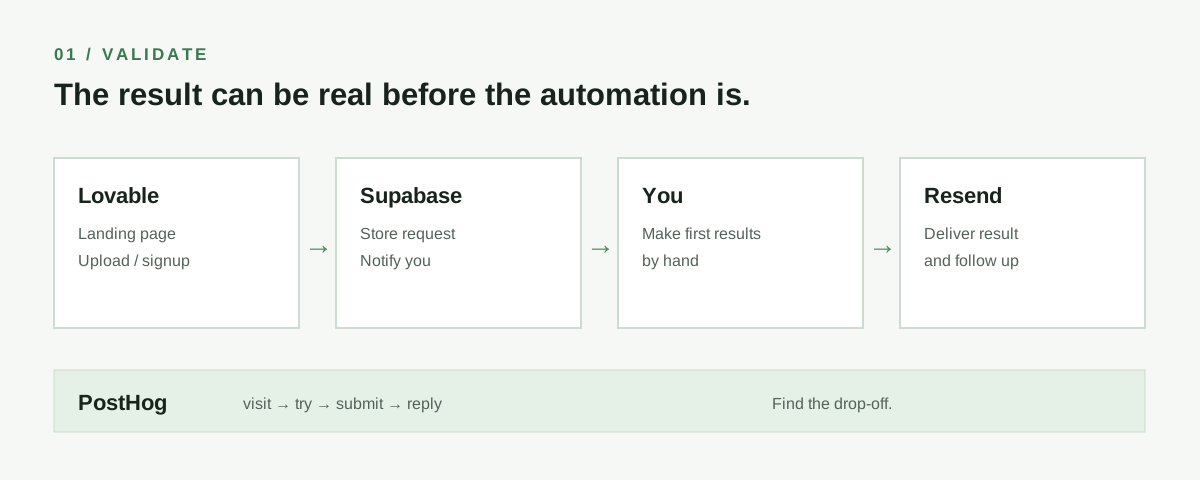
Another useful thing: track events, not only visits.
Don’t just measure:
1,400 people visited
Measure:
382 clicked try it
117 started the form
83 finished it
19 replied to the email
That tells you way more about whether the idea is interesting. If you have actual event counts, my Conversion Funnel Calculator can show where the largest drop happens before you put those steps into a PostHog funnel.
I want to validate this product idea: [DESCRIBE IDEA].
I do NOT want to build the full product yet.
Design the smallest possible validation architecture using Lovable, Supabase, PostHog and Resend.
Explain:
1. what should actually be built
2. what can be manually faked behind the scenes
3. what data should be stored in Supabase
4. which PostHog events I should track
5. what conversion funnel I should create
6. what emails should be sent through Resend
7. what would count as enough evidence to proceed to an MVP
Keep the architecture intentionally simple. Do not introduce extra services unless there is a very good reason.
2. You actually need a working app now
Once you need users to log in, save something, come back tomorrow, maybe pay, maybe upload files, then you’re already building an application.
Here I would split it into two paths.
Case A: normal SaaS or web app
Lovable + Supabase + Stripe + Resend + PostHog
This is honestly enough for a surprisingly large number of MVPs. If you choose this stack, connect a Supabase project you own to Lovable; Lovable currently also offers its own built-in backend by default.
Supabase gives you actual Postgres underneath, plus Auth and row level security, so your generated frontend doesn’t have to become your security model.
And this is one of those boring technical things that AI generated apps can screw up horribly: authorization is not the same thing as hiding a button.
If Alice logs in, she shouldn’t be able to change some request and suddenly read Bob’s records.
That’s where Supabase RLS actually matters. Auth identifies the user, while RLS decides which rows that user is allowed to access. Supabase’s RLS guide explains how database grants and policies work together.
For server side operations, API calls, Stripe webhooks or some AI generation step, Supabase Edge Functions are a pretty convenient next layer. They run server side TypeScript and can integrate with Auth, Postgres and external APIs.
A very normal MVP could therefore look like:
Lovable frontend → Supabase Auth → Postgres with RLS → Edge Function → external API
Then:
Stripe webhook → Edge Function → update subscription in Postgres
And:
user action → Edge Function → Resend
That’s already quite a real architecture.
Case B: the backend itself is the product
If you’re building something with workers, unusual APIs, scraping, file processing, queues, Python packages or some weird backend logic, I would probably move to Replit rather than forcing everything through a frontend builder.
Replit Agent can generate the application from natural language, while Replit also provides deployment and database integration in the same environment.
For example:
You want to build a competitor monitoring tool.
Input:
competitor URLs
System:
fetch pages → compare with previous version → ask LLM what materially changed → save result → send notification
That’s already much more naturally a backend application than a pretty generated UI.
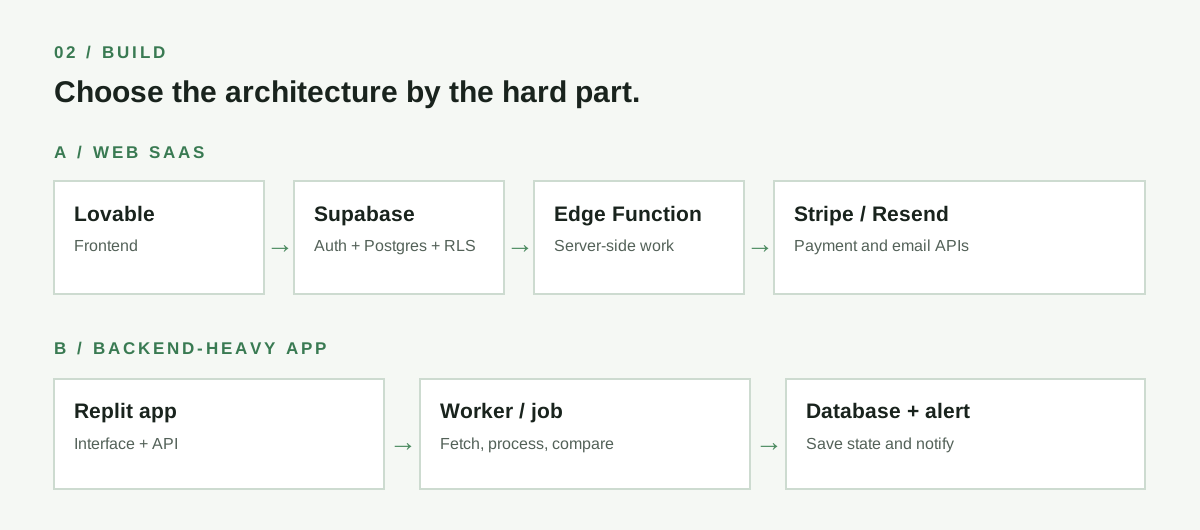
One very useful rule here:
Do not put your secret API keys in the frontend.
OpenAI key, Stripe secret, Resend key, whatever. If the browser can see it, assume somebody else can see it too.
Put these operations behind a server endpoint or function. Supabase’s data security guide covers this server-side boundary.
I want to build this MVP: [DESCRIBE PRODUCT].
Help me choose between:
A. Lovable + Supabase
B. Replit
C. a combination of both
Do not choose based on which tool you like more. Choose based on the actual technical requirements.
First identify:
1. frontend requirements
2. authentication
3. database entities and relationships
4. authorization rules
5. external APIs
6. background or long running jobs
7. file storage
8. payments
9. transactional email
10. analytics
Then propose the smallest architecture that is still technically sane.
Explicitly tell me which operations must happen server side and which secrets must NEVER be exposed in the frontend.
If using Supabase, propose the tables and RLS rules as well.
3. You want to stop doing something manually every damn day
This might actually be the most useful category for most people.
You don’t necessarily need a product.
You need a pipeline.
My default here would probably be:
Then connect whatever you already use around it.
Google Drive, Gmail, Slack, Telegram, Notion, Airtable, Supabase, OpenAI, Claude, APIs etc.
If you want something easier and very visual, Make is a very reasonable alternative and supports thousands of integrations, including generic HTTP connections when the service you need isn’t directly supported.
And the interesting part starts when you stop thinking:
trigger → action
and start thinking:
input → understand → decide → act → remember
For example, here’s a genuinely useful personal pipeline:
Gmail → n8n → LLM → classify → extract deadline → create task → Telegram notification
But don’t ask the LLM to simply “read my email and decide everything”.
Make it return structured data:
{
  "important": true,
  "category": "invoice",
  "deadline": "2026-10-14",
  "action_required": "pay invoice",
  "confidence": 0.94
}
Now the workflow can actually use the output reliably. n8n’s Structured Output Parser is one way to enforce the shape of a result.
That’s a tiny technical detail that makes AI automations much less fragile.
Another one:
Do not let AI perform irreversible actions directly whenever you can avoid it.
For example:
email → AI thinks this is spam → DELETE
Bad.
Better:
email → AI thinks this is spam → label “probably spam” → you confirm
Same with sending emails, publishing content, deleting files, updating production data etc.
Put a human approval step where the cost of a wrong decision is high.
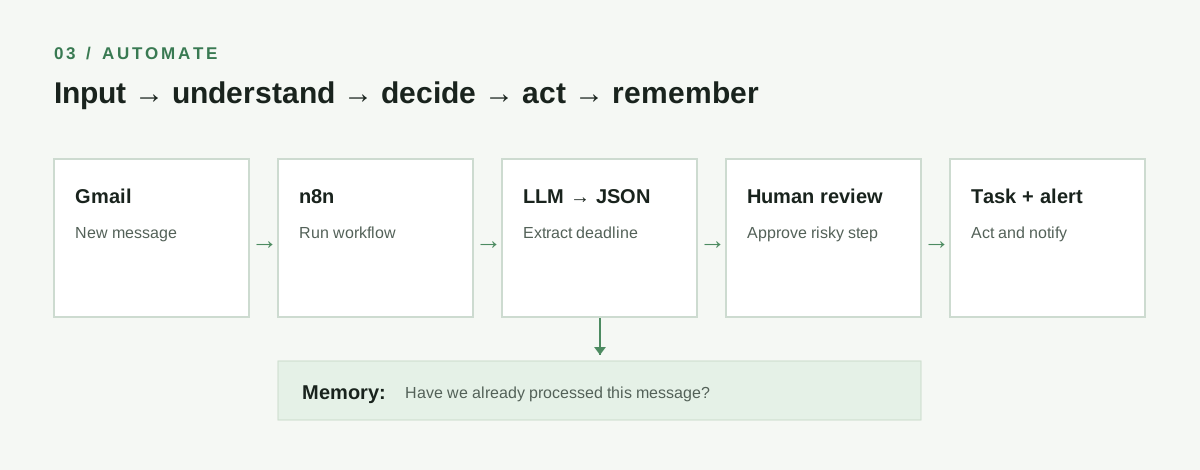
Some actually useful pipelines
Personal research pipeline
RSS / websites / newsletters → n8n → extract text → deduplicate → LLM ranks relevance → save interesting ones → one Telegram digest
Instead of reading 80 things, you read 7.
Meeting pipeline
Calendar meeting ends → transcript appears → LLM extracts decisions and actions → create tasks → send short summary
Content pipeline
Idea in Telegram → n8n → save to Notion → LLM categorizes it → generates research questions → waits
Notice that I’m not saying “generate the post”.
The useful part might simply be removing the stupid organizational work around writing it.
Online observability
Google Alerts / Reddit search / X or external APIs / product reviews → workflow → remove duplicates → classify sentiment/topic → notify only when something interesting happens
So instead of Googling yourself, company or competitor every few days, the system does that part.
4. The genuinely interesting part: let AI produce data, not prose
This is probably one of the biggest differences between a fun automation and something you can actually depend on.
Don’t ask:
Read this support ticket and tell me what to do.
Ask:
Analyze this support ticket and return ONLY valid JSON using this schema:
category: billing | bug | feature_request | account | other
urgency: 1 to 5
requires_human: boolean
customer_sentiment: positive | neutral | negative
summary: maximum 200 characters
Now another part of your pipeline can actually route it.
urgency >= 4 → Slack
billing → billing queue
requires_human = false → generate draft
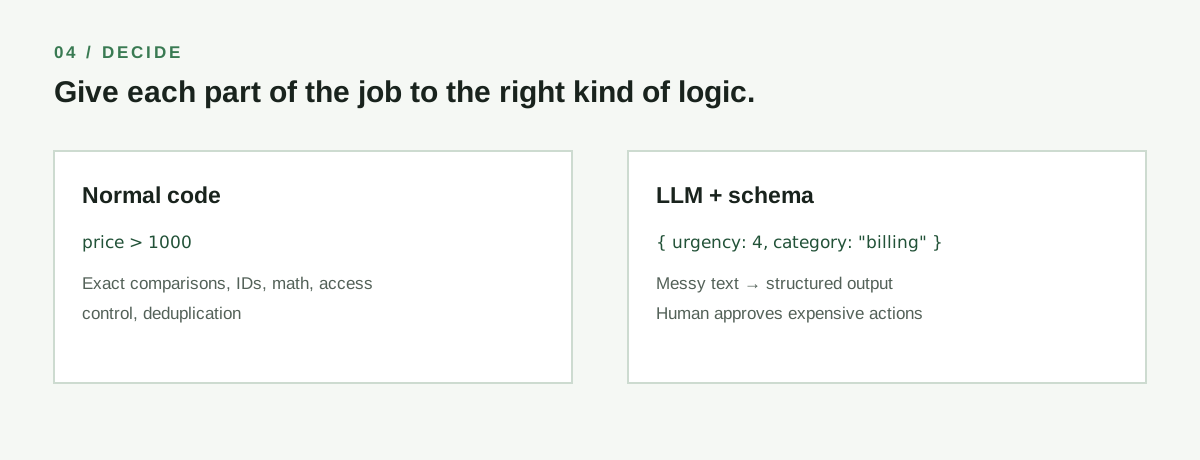
LLMs are much more useful inside software when they’re treated as one slightly unreliable function inside a bigger deterministic system, rather than some magic guy controlling the whole thing.
5. And give your workflow memory
Let’s say you create an AI research pipeline.
Without memory:
Monday it finds article X.
Tuesday it finds article X again.
Wednesday it finds somebody discussing article X and proudly tells you again.
Store what you’ve already processed.
This can literally be one Supabase table:
source_url
hash
first_seen
summary
topic
Then before processing something expensive:
Have I already seen this?
If yes, skip it.
Very simple. Suddenly your pipeline feels about 5 times smarter.
6. Don’t automatically make everything AI
This sounds stupid in a post called AI Tips&Tools, but it matters.
If this works:
price > 1000do not replace it with:
Ask GPT whether this price appears relatively expensive in the context of the transactionPlease.
Normal code is faster, cheaper and deterministic.
Use the LLM where the input is fuzzy.
Understanding language.
Classification where rules become horrible.
Summarization.
Extraction from messy documents.
Matching things by meaning.
Generating something.
Leave mathematics, IDs, exact comparisons, access control and most boring business rules to boring normal code.
Boring is fantastic when it works every time.
The three stacks I’d actually remember
Test whether anybody cares
Lovable + Supabase + PostHog + Resend
Build something people can actually use
Lovable + Supabase for normal web SaaS
or
Replit when backend logic becomes the interesting part
Then add Stripe, Resend and PostHog when you actually need them.
Automate your own work
n8n + the tools you already use + LLM + some small database for memory
And probably the most useful prompt from this whole post:
I currently do this manually:
[DESCRIBE THE PROCESS IN NORMAL HUMAN LANGUAGE]
Design an automation for it.
Separate the workflow into:
deterministic steps that should use normal logic,
fuzzy steps where an LLM actually makes sense,
actions that should require human approval,
state that needs to be stored so the workflow remembers what it already did.
Prefer n8n and services I already use. Keep the number of moving parts as small as possible.
For every LLM step, define the exact structured JSON output it should return.
Also tell me how this workflow can fail and what I should log so I can debug it later.
Because this is kinda the whole point. AI doesn’t mean you suddenly have to become an engineer. But it also doesn’t mean engineering stopped mattering.
You can now build an absurd amount of stuff without knowing everything underneath it. You just need to know enough to understand where the dangerous parts are, where AI is useful, and where you really shouldn’t let it freestyle.
Download the tips here
Keep the full guide as a PDF, or use the editable slides to explain the workflows.